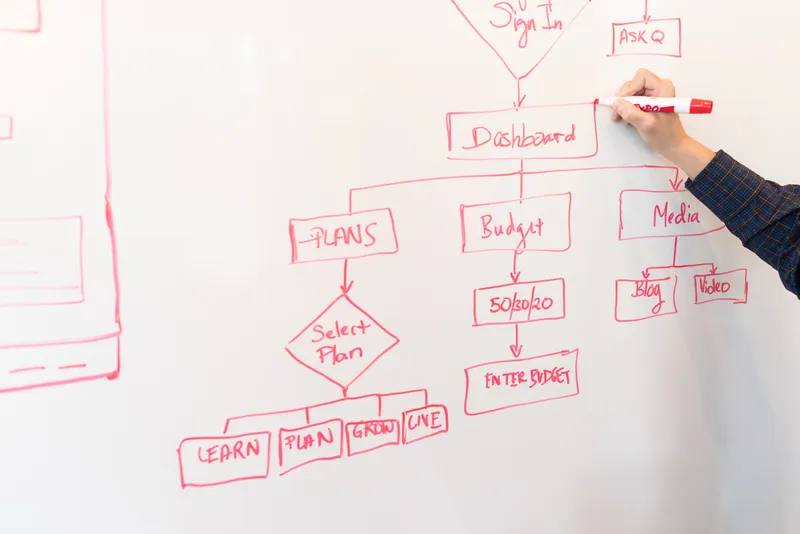
Workflow automation means setting up a rule so that when something happens (a form gets submitted, an invoice arrives, a deal closes), the next steps happen on their own, without anyone copying data between systems or sending a "just checking in" email. Below are 12 examples that show up across most small and mid-sized businesses, in roughly the order I get asked about them.
TL;DR
The 12 examples below cover sales, support, finance, HR, and ops. Invoice processing and onboarding are the two that pay for themselves fastest. The one that gets pitched the most and survives the least is "AI agent reads every email and decides what to do". Skip to the demo trap section if that is the one you were Googling. And before picking any of them: the right starting point is whichever one your team copy-pastes between systems most often, not the one that looks best in a sales deck.
What workflow automation actually is
Strip away the marketing and a workflow automation is three things: a trigger (something happens), a condition (an optional check, like "is this over €500?" or "is this customer a VIP?"), and an action (the system does the next step). Every example in this post is a variation on trigger, condition, action.
(Yes, that is also how a thermostat works. No, I will not stop pointing that out. Most "AI-powered workflow" pitches are a thermostat with better marketing.)
The reason this matters: if you cannot describe your idea as "when X happens, and if Y is true, then do Z", it is not a workflow automation yet. It is still a process that lives in someone's head, and you need to map it out before any tool can run it.
The invoice example, and why it is the best one
Of the 12 examples in this post, invoice processing is the one I would point to if you only have time for one. Here is why, with a real before-and-after.
A mid-sized company I worked with was processing 30-50 invoices a week the old way: print, manually document, then a finance employee walked around the office getting physical approvals from each department. Every single invoice, every single day.
When I showed her the automated version (invoice arrives by email, key fields get extracted automatically, approval requests go out digitally, no more walking), she went quiet. Not impressed quiet. Worried quiet. She thought it meant her job was going away, or worse, that it would take away the only part of her day where she actually talked to people.
I told her: "You will have way more time to talk to people now. You will just do it after the invoices are processed, not instead of." After the demo, she got it. She now handles 50-100 invoices a week: double the volume, same person, no more walking. Roughly 15-20 hours a week freed up.
That is the pattern I keep seeing across the examples below: the workflow does not remove the person, it removes the part of the job that was never really the job.I have written more on the invoice case specifically in should you automate your invoice processing if that is the one that applies to you.
12 workflow automation examples that hold up
Roughly in order of how often I see businesses get value from them. None of these need custom development. Zapier, Make.com, or n8n cover all 12 with off-the-shelf connectors. (See Zapier vs Make.com if you are choosing between them, or my Make.com review for the one I use most.)
Sales lead routing
A form fill or new contact comes in, gets scored or tagged by territory/value, and lands in the right rep's queue with a Slack ping, instead of sitting in a shared inbox until someone notices. The win is speed: the lead that gets a response in 5 minutes converts at a meaningfully higher rate than the one that waits a day.
Support ticket routing
Incoming tickets get tagged by keyword or category (billing, bug, refund) and assigned to the team that actually handles that type, with priority bumped automatically for certain customers or words like "cancel". Saves a triage person and stops urgent tickets sitting behind routine ones.
Invoice processing and approvals
An invoice arrives by email, gets read by OCR or an AI extraction step, matched against a purchase order, and routed for approval if it is over a threshold, or paid automatically if it is not. This is the one I have built more than any other, and it is the example below.
Employee onboarding
New hire gets marked as "hired" in your HR tool, and that single event fans out: an account gets created in your email and access systems, a welcome email goes out with day-one instructions, equipment gets ordered, and a checklist gets assigned to their manager. One trigger, five systems updated, zero manual handoffs.
Purchase order approvals
A purchase request above a set amount gets routed to a manager for sign-off before the order goes out; below that amount, it is logged and processed automatically. The threshold is the whole point: most spend does not need a human, but someone should still see the big stuff before it goes out the door.
Recurring report generation
Every Monday morning, a workflow pulls numbers from your project tool, CRM, or spreadsheet, drops them into a template, and emails it to the people who need it, before anyone has opened their laptop. No more "can someone send me last week's numbers" on a Tuesday.
Social media scheduling
Content gets queued in a spreadsheet or content calendar, and a workflow posts it across platforms at the scheduled time, resizing images and adjusting captions per channel automatically. Not glamorous, but it is the one that quietly saves someone 2-3 hours a week of manual posting.
Customer feedback collection
A few days after a purchase or job completion, a survey goes out automatically. Responses get tagged by sentiment, negative ones trigger an alert to a manager, and positive ones get routed to a "can we use this as a testimonial" list. The follow-up that never used to happen, now happens every time.
Payroll and expense approvals
Expense submissions over policy limits get flagged for review; everything within policy gets approved and queued for the next payroll run automatically. The finance team stops being a bottleneck for the 95% of expenses that are completely normal.
IT incident escalation
A monitoring alert fires, gets classified by severity, and routes to the on-call person via the right channel: SMS for "the site is down", a ticket for "this can wait until morning". The point is matching urgency to the channel, not generating more notifications.
Meeting scheduling and prep
A booking link triggers a calendar event, sends a confirmation with a prep document, and creates a reminder task for whoever needs to prepare, all from one click by the person booking. Removes the "does Tuesday work for you, how about Wednesday, actually Thursday" email chain that, somehow, still exists in 2026.
Document automation (portal to ERP)
Documents land in a client portal or shared folder, get classified and renamed automatically, key fields get extracted, and the data flows into your ERP or bookkeeping system without anyone retyping it. This is the quiet workhorse behind a lot of the invoice and onboarding examples above. It is the plumbing, not the headline.
Onboarding (#4) deserves a number, because it is one of the few areas where SHRM's research has a clean number attached: new hires with a structured onboarding process are 50% more productive in their first monthsand considerably more likely to stick around. Automating the admin around onboarding does not create that effect on its own, but it removes the excuse for not doing onboarding properly, which is "we don't have time."
The example that dies in week three
Every "workflow automation examples" article I have read in the last year includes one variation of this: an AI agent reads every incoming email, decides what kind of request it is, and routes or replies automatically across the entire inbox. It demos beautifully. Someone sends a test email, the agent classifies it correctly, everyone in the room nods. (Somewhere, a Terminator-themed PowerPoint slide is having its moment.)
Here is what happens in week three: a real customer sends an email that is half a complaint, half a question, with an attachment that is actually for a different department, written in a tone the model has never seen from this particular client before. The agent guesses. It guesses wrong. Nobody notices for two days, because the whole point was that nobody had to look anymore.
I am not saying AI email triage does not work. It does, for a narrower slice than the demo suggests. The pattern I keep seeing is the gap between "handles 80% of emails correctly" and "handles emails without anyone checking," which are two completely different products being sold as one.
The fix is boring: keep a human in the loop for anything outside a narrow, defined category, and only widen that category once you have measured the error rate for a few weeks. That single sentence is the difference between automation that compounds and automation that becomes a support ticket about itself.
How to pick which one is yours
With 12 examples on the table, the temptation is to pick the most impressive one. Resist that. Here is the actual filter, in order:
- Frequency: does this happen daily or weekly? Automating something that happens twice a year is not worth the setup time, however annoying it is.
- Rule clarity: can you write the logic in one sentence without "it depends"? If the answer always involves a judgment call, automate the data-gathering and leave the decision to a person.
- Cost of getting it wrong: invoice approvals and payroll need a human checkpoint above a threshold. Social media scheduling does not. Match the safety net to the stakes.
- Number of systems involved: one app to another is a 30-minute build. Three or more systems with conditional logic is a multi-day project, and worth scoping properly first.
I reckon most businesses overthink the tooling and underthink the first filter.Try the simple version first: a basic Zapier or Make.com connection between two apps clears about half the requests we'd otherwise get called in for. If that covers your case, you do not need anything in this post beyond what you can build yourself this afternoon. For the bigger picture on whether a given workflow is worth the investment, I cover the maths in automation ROI.
Worth knowing: hyperautomation adoption is not a fringe trend anymore. Gartner projects that 30% of enterprises will automate more than half of their routine operational activity by the end of 2026, up from under 10% in 2023. Small businesses are not enterprises, but the direction of travel is the same. The gap is who gets there with a €0 Zapier setup versus a €15,000 custom build, and most of the 12 examples above belong firmly in the first camp.
When to leave it alone
Not every example on this list applies to every business, and that is fine. If a process happens rarely, changes constantly, or only exists because two systems were never properly connected (fix the connection, not the symptom), automating it just gives you a faster version of a problem. I wrote a full breakdown of the situations where the right call is to wait in when not to automate.
The honest version: most of the value in this post is in examples 1-5. If you implement those and stop, you will have captured most of the available win for a typical small business. Examples 6-12 are real, but they are polish, not foundation. Build the foundation first. For the bigger-picture view on what this costs and how to scope it, see business process automation.
Frequently asked questions
What are some examples of workflow automation?
Common ones: routing sales leads to the right rep, assigning support tickets by category, approving invoices and purchase orders automatically below a threshold, sending onboarding tasks to HR/IT/finance when a new hire is marked as starting, generating weekly reports from your project tool, and scheduling social posts. The pattern is always the same: a trigger (something happens), a condition (check), and an action (do the next step without a human typing it).
What is the easiest workflow to automate first?
Anything that is purely repetitive, has no judgment calls, and you do at least weekly. Invoice approvals under a fixed amount, new-lead notifications, file-naming and folder routing, and recurring report generation are the usual starting points. If you can write the rule in one sentence, something like 'if X happens, do Y', it is a good first automation.
How long does it take to set up a workflow automation?
A single trigger-action automation in Zapier or Make.com: 30 minutes to an hour, including testing. A multi-step workflow with approvals, conditions, and several apps: a few days to map and build properly. Anything that touches your ERP or accounting system and needs custom logic: budget 2-4 weeks, which is the timeline I quote for that kind of project.
Do I need a developer to build workflow automations?
For most of the examples in this post, no. Tools like Zapier, Make.com, and n8n are built for non-developers and handle 70-80% of common business workflows with no code. You need a developer when the workflow involves custom calculations, an API that no-code tools do not support, or logic complex enough that a visual canvas becomes harder to read than actual code.
What workflow should I automate first in a small business?
Whichever one currently involves the most copy-pasting between two systems. Nine times out of ten that is invoice handling, lead capture into a CRM, or sending the same follow-up email manually. Pick the one that happens most often, not the one that feels most impressive. Frequency beats complexity when you are choosing where to start.
Can workflow automation replace an employee?
Rarely, and that is usually not the point. In the projects I have run, automation removes the repetitive 60-80% of a role and leaves the 20-40% that needed a person anyway: judgment calls, exceptions, relationships. The honest framing is that it changes what someone spends their day on, not whether they have a job.
What tools are used for workflow automation?
For small businesses: Zapier and Make.com cover most trigger-action workflows. n8n is the open-source, self-hostable option if you want more control. For workflows that live inside one ecosystem (Google Workspace, Microsoft 365), the native automation tools (Apps Script, Power Automate) sometimes make more sense than a third-party platform.
Why do some workflow automations fail after a few weeks?
Usually because the underlying process was not documented before it was automated. The automation works fine for the 80% of cases it was built for, then someone hits an edge case it cannot handle, the workflow breaks silently, and nobody notices for two weeks. The fix is not a better tool. It is mapping the process and its exceptions before you build anything.
Tijdo Koster
Automation consultant since 2009. 100–200 projects. Still answers his own emails.
If you read all 12 and thought "I only really need #3 and #4", good, that means this post worked. Most businesses do not need a workflow automation strategy. They need two specific things connected so a person stops retyping the same data every Tuesday.
More on the blog if you want to keep reading, or the products page for templates that cover the most common ones.
Some links in this post may be affiliate links. Read the disclosure.